http://www.scribd.com/doc/24470331/iPhone-iPad-and-iPod-touch-Apps-for-Special-Education
Tuesday, March 06, 2012
Update: Link to Eric Sailer's List of iPad, iPhone, and iPod Touch Apps for Special Education
http://www.scribd.com/doc/24470331/iPhone-iPad-and-iPod-touch-Apps-for-Special-Education
Friday, October 28, 2011
Quick Link: 60 Minutes Segment -iPads and Autism Segment
http://www.cbsnews.com/video/watch/?id=7385686n
Saturday, July 09, 2011
"RISE AND SHINE": TED talk video by Simon Lewis about his recovery from a serious brain injury, and how technology helped.
Simon Lewis was in an automobile accident that resulted severe injuries to his body, including a very severe head injury that left him in a coma. As a result of his experience, he wrote a book, "RISE AND SHINE", covering his journey over 15 years of recovery and regeneration. In the book, Lewis shares what he learned along the way, and how cutting edge technology and some non-traditional thinking helped him move forward.
Simon Lewis had the opportunity to discuss his journey at a TED partner event in India in December, 2010. The following video of his talk is about 22 minutes long, but worth taking the time to watch. A variety of visuals are used to illustrate his journey and the research he did along the way. Near the end of the video, Simon Lewis demonstrates some of the technologies that he wears that supports his functioning.
Here is the blurb about the book from the Borders website:
"An impassioned tale of survival and recovery, this inspirational story recounts the author’s horrific car accident, his subsequent coma, and the more than 15 years of cutting-edge treatments and therapies endured during convalescence. With specific details of the rigorous rehabilitation process that ensued, including numerous breakthrough and experimental surgeries, the book also provides practical insight into navigating the treacherous world of insurance and how to differentiate between the often conflicting medical opinions offered. In addition to describing the numerous procedures undergone, the author tells not only of his pain, frustration, and despair, but also of his childlike wonder at the beauty and miracle of creation. A first-person account of sudden, unexpected tragedy and life-affirming courage, this remarkable tale of regeneration imparts lessons both medical and spiritual."
The Rise and Shine website includes many of the graphics used in Simon's video, and is worth taking some time to explore. Some of the graphics are interactive. (Since the website relies on Flash, it won't work if you try to access it using an iPad.)
Comment: As a school psychologist with additional training in neuropsychology - specifically assessment and intervention for children and teens who have experienced traumatic brain injury (TBI), this topic is important to me. I'm watching the video a second time, and I plan to read his book.
(Cross-posted on the Interactive Multimedia Technology blog.)
Wednesday, January 12, 2011
Multi-modal Interactive Maps for People With Visual Impairments: Featuring a Stantum multitouch screen with a tactile layer
To learn more about this project, take a look at the video and related publications below. This is a great example of a team that is harnessing emerging technologies to improve the lives of people with disabilities.
Video: "Multimodal Maps for Blind People"
Website
Publications
Anke Brock, Philippe Truillet, Bernard Oriola, Christophe Jouffrai (IRIT CNRS and Universite de Toulouse) Usage of Multimodal Maps for Blind People: Why and How
ITS’10, November 7–10, 2010, Saarbrücken, Germany
Paper: http://www.irit.fr/~Philippe.Truillet/projects/doc/MultimodalMapsForTheBlind-ITS10.pdf
Poster: http://www.irit.fr/~Philippe.Truillet/projects/doc/Poster-ITS10.pdf
Stantum (Multi-touch screen used for the application.)
Ivy Middleware (Used in this application.)
Cross-posted on the Interactive Multimedia Technology blog
Thursday, November 11, 2010
NY Times article and Video: iPad Opens World to a Disabled Boy
I meant to post a link to this article a while ago:
iPad Opens World to a Disabled Boy
Emily B. Hager, New York Times, 10/12/10
Cross posted on the Interactive Multimedia Technology Blog
Tuesday, November 02, 2010
EyeTube for YouTube! Eye-gaze interaction software, free and downloadable from GazeGroup
Gaze interaction systems provide access to computers and the rich content now available on the web for many people with disabilities. Unfortunately, commercial gaze tracking systems are very expensive and at times, difficult to calibrate. There is hope!
Following up on my recent post, "Open-source Eye-tracking: The ITU Gaze Tracker 2.0 Beta", I thought I'd share the GazeGroup's EyeTube for YouTube interface. What is great about EyeTube for YouTube is that it provides two different interfaces. The simplified version looks good for younger children or people with cognitive disorders, and is icon-based. The second version is appropriate for people who can navigate through more complex visual representations of content. EyeTube requires a Windows-based system and .Net 3.5 at this time. It can be downloaded from the GazeGroup website. If you plan to download the application, you must also make sure you have a YouTube account. To get the application up and running, you'll need to change the settings (EyeTubeSettings.xml) to match your account. (If you don't know much about changing settings or xml, ask someone you know who works in IT.)
Below is the icon-based version of the eye-gaze interface for YouTube:
Feature-rich version of the EyeTube interface for YouTube:
From the GazeGroup site:
"The EyeTube prototype offers a feature rich eye controlled interface for the popular YouTube service. Instead of emulating a mouse pointer and interacting with a web browser the EyeTube interface is especially designed to be driven by gaze input. It offers a wide range of features such as keyword searching, popular video feeds, favorites and social aspects such as subscriptions, friends and commenting on videos.The highly optimized interfaces allows for a streamline interaction which is aleviated from the Midas Touch problem. In most previous gaze interfaces selection is made by a dwell time activator, e.g fixat a button for a specific amount of time and it will execute the function. In the EyeTube interface a fixation on a U.I element will highlight it and a second fixation on the activation button is required to execute the function. This removes the stress of having to constantly move the eyes to avoid unintentional activation."
The GazeGroup
(The individuals mentioned below may be currently working elsewhere, but involved in the gaze research in some way.)
- John Paulin Hansen, Head of group (Ph.D. in Psychology)
- Dan Witzner Hansen, Associate professor
- Javier San Agustin, PhD student
- Sune Alstrup Johansen, PhD student
- Henrik Hegner Tomra Skovsgaard, PhD student
- Martin Tall, PhD student (Now working at Duke University, North Carolina)
San Agustin, J., Skovsgaard, H., Hansen, J. P., and Hansen, D. W. 2009. Low-cost gaze interaction: ready to deliver the promises. In Proceedings of the 27th international Conference Extended Abstracts on Human Factors in Computing Systems (Boston, MA, USA, April 04 - 09, 2009). CHI EA '09. ACM, New York, NY, 4453-4458. DOI= http://doi.acm.org/10.1145/1520340.1520682
San Agustin, J., Hansen, J. P., Hansen, D. W., and Skovsgaard, H. 2009. Low-cost gaze pointing and EMG clicking. In Proceedings of the 27th international Conference Extended Abstracts on Human Factors in Computing Systems (Boston, MA, USA, April 04 - 09, 2009). CHI EA '09. ACM, New York, NY, 3247-3252. DOI= http://doi.acm.org/10.1145/1520340.1520466
Tall, M., Alapetite, A., San Agustin, J., Skovsgaard, H. H., Hansen, J. P., Hansen, D. W., and Møllenbach, E. 2009. Gaze-controlled driving. InProceedings of the 27th international Conference Extended Abstracts on Human Factors in Computing Systems (Boston, MA, USA, April 04 - 09, 2009). CHI EA '09. ACM, New York, NY, 4387-4392. DOI= http://doi.acm.org/10.1145/1520340.1520671
- EyeArt - EyeArt eye-drawing program, developed by Andre Meyer and Markus Dittmar, Technical University of Dresden, Applied Cognitive Research Unit, Germany.
- GazeTrain - Gaze-controlled action oriented puzzle game, developed by Lasse Farnung Laursen, Technical University of Denmark
- Puzzle - Simple puzzle game that can be played with eye movements, developed by Vytautas Vysniauskas, Siauliai University, Lithuania
- Road to Santiago - Gaze-controlled adventure game (full game), developed by Javier Hernandez Sanchiz, Universidad Publica de Navarra, Spain
- Snap Clutch - An application that uses eye gaze data to generate key and mouse events for playing games such as World of Warcraft and Second Life.
- ASE: Accessible Surfing Extension for Firefox - Follow this link to access ASE, an Accessible Surfing Extension for Firefox, developed by Emiliano Castellina and Fulvio Corno at Politecnico di Torino. (Note that this is a beta version.)
- Eye Gaze Music (SAW Selection Sets) - Point and Play – eye gaze (direct pointing) musical activities, developed by DART. Please note that SAW (Special Access to Windows) framework application is needed to play these 15 music selection sets. SAW is available for free athttp://www.oatsoft.org/Software/SpecialAccessToWindows
- EyeTube - Gaze interaction for YouTube - Follow this link to get more information and download EyeTube at ITU GazeGroup's web pages
- Eye3D and other head eye mouse software - Eye3D for education, and a collection of links to free software that works with head or eye mouse. Includes links to downloads and original sites.
- Gaze-controlled Breakout - Follow this link to access a modified version of the LBreakout2 game which can be operated by an SMI eye tracker, developed by Michael Dorr et al. at University of Luebeck
- Oleg Spakov's Freeware games for MyTobii - Follow this link to access MyTobii compatible games developed by Oleg Spakov, University of Tampere, Finland
- Free ITU Gaze Tracker and applications - Download a webcam based open-source gaze tracker and several applications that work with it, developed at IT University of Copenhagen
- GameBase - Check out the Eye-Gaze Games category at the SpecialEffect GameBase!
- More information about Gaze-Controlled Games - Follow this link to see a list of online information resources on using gaze for the control of games and other leisure applications
Wednesday, September 08, 2010
iPad Apps: Supporting Communication for Young People with Autism (& Links to Moms with Apps)
Have you ever watched a kid pick up an iPad for the first time and just go with it?
Some parents have found that the same is true for their of children who have autism. The iPad is a great way to support learning and communication in that it is user-friendly and easy for children- and parents- to understand.
Here are two videos that were shared with my by Liz Ditz, author of the "I Speak of Dreams" blog. The first video is of a boy with autism. The second video is of his little sister, interacting with the iPad to watch a "home-made" social story about a family trip to a coffee shop, created in the "Stories to Learn" app.
iPAD Spelling App
YOUTUBE INFO:
YOUTUBE INFO:
"Our family (and a friend) worked together to make this social story about visiting our local coffee shop for my son with autism. We used Stories2Learn (http://itunes.apple.com/us/app/stories2
RESOURCES
Moms with Apps
Moms with Apps for Special Needs
Moms with Apps: Characteristics of great apps for kids with autism
SOMEWHAT RELATED
Posts on the I Speak of Dreams blog:
- What Are The Most Important Research Questions About Interventions for Emotional and Behavioral Disorders?
- What Are The Most Important Research Questions About Interventions for Learning Disabilities?
Saturday, August 21, 2010
Reflections on Technology: Interactive Whiteboards, School Psychology, and Speech & Language Services...
Background: For those of you who are new to this blog, I work as a school psychologist in a public school district in North Carolina. During the mid 2000's, I took a variety of computer courses, leading up to a decision to work part time while taking graduate courses part-time such as human-computer interaction, games, information visualization, ubiquitous computing, VR, etc. I returned to work full time in 2008, due to the economic downturn.
I continue to maintain my passion for technology that supports natural user interaction, and share my interests on this blog and to a lesser extent, two other blogs. I initially started blogging because it was a requirement for one of my courses, and found that my blogs served me well as on-line filing cabinets.
Update: I don't usually post much about my work on this blog, but I have some exciting things to share.
New School Year, New SMARTBoard: I'd like am excited about the upcoming school year because my "home" school, Wolfe, a program that serves mostly teens and young adults up to age 22 who have more severe disabilities (including autism), now has an interactive whiteboard in every classroom.
School started for Wolfe students on July 26th, and three more whiteboards were installed. One of the new SMARTboards is in the speech and language room, along with a multi-touch SMARTTable the school received last April, one is in the Art/Work Adjustment room, and one is in the room I use with small groups of students, which is used for music one day a week.
Although I have used interactive whiteboards in my work with students for several years, this is the first year that I have had one available to me most of the time in a school. Since most of the teachers received their IWBs over the past year, there is a pressing need to figure out what works, why it works, and how to create useful interactive content that is appropriate for the needs of students who have severe or multiple disabilities. We really can't wait.
Why is this important to me?
Technology and my role as a school psychologist:
Designing effective interventions is part of my job as a school psychologist, and mixing interactive whiteboards and interventions is fairly uncharted territory. I know that there are probably a few other school psychologists, counselors, social workers, and speech/language therapists out there who are wondering what to make of this technology and the students they serve directly, or indirectly through consultation. There isn't much literature about this topic, so it is difficult to know what is truly "evidence based".
We are in the process of discovery. Within a school that has an IWB in every classroom, serving students with the most complex needs within the school district, how can I best follow professional school psychology practices(pdf) regarding the provision of direct and indirect services. Some of these expectations are listed below:
I work closely with my colleague Kelly Cross, a speech and language therapist who serves Wolfe school and two classrooms of students with severe autism at a "regular" elementary school. Kelly also serves as the assistive technology and augmentative communication consultant for our school district. She's used interactive applications and web resources for many years along with more traditional "hands-on" materials, but like me, has had limited access to IWB's until recently. She now has a SMARTboard in her room, along with the portable multi-touch SMARTTable Wolfe received last April. We work with many of the same students, so with the influx of IWBs in our school, we've stepped up our collaboration.
One of Kelly's challenges is to figure out ways for teachers to integrate assistive technology and/or augmentative communication systems into their work with students during activities that involve interactive whiteboards. Most of the research the area of assistive technology/aug com focuses on the use of technology to access applications as they are displayed on laptops or computer monitors, or factors related to the use of individual communication devices. The vSked project, led by Dr. Gillian Hayes at the University of California at Irvine, is on the right track in that it incorporates the use of a large interactive display that was used with students with autism, along with smaller hand-held communication systems, which I've discussed in a previous post.
vSKED in action
Workshop Presentation
This past week, Kelly and I presented at a workshop held in the Arlington VA school district that focused on the use of interactive whiteboards and related applications and web resources with students with special needs. We shared some of the exciting things we've noticed with our students and shared "before and after" examples. Included in the presentation were some of the video clips I quickly put together during the first days of school that had an impressive positive impact with students when they were used during interactive whiteboard activities. (Some of these video clips can be found in a previous post: Video clips that help students with autism learn and feel calm at the same time!)
During the workshop, we discussed a few guiding principals, such as the "least dangerous assumption" and the concept of Universal Design for Learning. We also provided a sampling of resources previously used on the "small screen" appear to powerful when used with students interacting on the larger whiteboard screens. Below are a few of the resources we shared:
Clicker5 is an application to support reading and writing that provides a natural voice output, and child-friendly word processor. It works well on interactive whitboards It can incorporate several communication symbol systems. It is a good tool for informal assessment with students with communication and other related needs.
Teachers who want a limited browsing environment for their students the Zac Browser is great for use on IWBs and the new large all-in-one touch screen displays:
Considerations:
One thing we've learned over the past few months is that it is bit more complicated to create content and activities for the SMARTTable than for the SMARTBoard notebook or Promethean flipchart. We hope to have it customized to support scaffolded, customized classroom activities for students with special needs, but it might take more time than we had anticipated. The school's immediate need is for touchable interactive content for all of the classroom IWB's, suitable for our students.
Complications:
Programming for the SMARTTable, for those who have 64-bit computers, requires Windows 7, Visual Studio 2008, and Expression Blend 3. My HP Touchsmart, my home computer, is 64 bit, but runs Vista. My school-issued laptop runs Windows XP and is also 64-bit. To upgrade it, I will have to send it to the tech department for several weeks. It will be slow-going, since I have to plan for my day-to-day activities and evaluations with students first.
Possible SMARTTable Solutions:
I'm hoping that some students from UNC-Charlotte might want to try their hand at multi-touch programming and help us out! We'd welcome volunteers from other universities as well. Wolfe's principal, Mary Jo Breckenridge, is very supportive of the use of innovative technologies with students with special needs, and would figure out a way to make a collaboration happen.
Also posted on the Interactive Multimedia Technology blog
Saturday, April 17, 2010
Call for Papers: Theme Issue on Technologies for Autism
FYI:
Call for Papers: Theme Issue on Technologies for Autism
Editors: Gillian Hayes, University of California, Irvine and Karrie Karahalios, University of Illinois, Urbana-Champaign
Publication: Personal and Ubiquitous Computing
Autism Spectrum Disorder (ASD), also known as Pervasive Development Disorder, includes impairments in social interaction, communication—both verbal and non-verbal—and stereotypical or repeated behavior, interests and activities. A recent report by the Centers for Disease Control using data from the United States in 2006 indicated a rise in prevalence of ASD to 1 in 110 children: 1 in 70 boys and 1 in 310 girls. Individuals across the Spectrum can potentially benefit from the use of novel computing technologies, including assistive and augmentative technologies, social computational systems, sensing and context-aware systems, capture and access applications, wearable systems, and more.
This special issue calls for original research and methodology papers on the integration of personal and ubiquitous computing technologies in support of individuals with Autism Spectrum Disorder. The purpose of this special issue is to bring together a set of research papers that will (1) advance our understanding of Technologies for autism, (2) discuss the role of technology in Supporting individuals with ASD, their friends and families, and (3) provide examples of effective technologies for autism. Through this special issue, we hope to bring together a diverse set of researchers working in autism, pediatrics, computer science, cognitive science, education, sociology, psychology, anthropology, information science, and more.
Topics of interest include (but are not limited to):
Empirical studies exploring issues related to autism that might be amenable to technological intervention;
Empirical studies of technologies in use to support individuals with ASD;
Methodologies for conducting research on technologies for autism;
New designs and technologies that support individuals with ASD, their friends, relatives, co-workers, and acquaintances;
Evaluation techniques for technologies for autism;
Case studies on the deployment and long-term use of technologies for autism.
Important Dates:
Papers to be submitted: August 16, 2010
Peer reviews completed: November 16, 2010
Revisions completed and submitted: January 1, 2011
Publication date: March/April 2011
To submit your paper, please email as PDF format to gillianrh@ics.uci.edu and kkarahal@cs.uiuc.edu
RELATED:
Here are a few of my posts related to technology, intervention, and autism spectrum disorders in some way. I hope that the links and references I've posted will be helpful to researchers in this important field of study and practice:
Monday, April 05, 2010
TPACK Framework: Technological Pedagogical Content Knowledge, Assistive Technology, and Universal Design for Learning
Note: This did not format properly on my last post. This is a discussion about assistive technology and 21st Century Schools, and is important information for educators, special educators, school psychologists, speech and language therapist, or anyone else who works with at-risk students and technology in the schools.
1) TPACK Framework 2) TPACK Framework Applied to Assistive Technology
Marino, M. T., Sameshima, P., & Beecher, C. C. (2009). Enhancing TPACK with assistive technology: Promoting inclusive practices in preservice teacher education. Contemporary Issues in Technology and Teacher Education,9(2). Retrieved from http://www.citejournal.org/vol9/iss2/general/article1.cfm
Abstract: "As the global community continues the transition from an industrialized factory model to an information and now participatory networked-based society, educational technology will play a pivotal role in preparing students for their futures. Many teacher preparation programs are failing to provide preservice teachers with the knowledge, skills, and dispositions necessary to adopt and utilize technology effectively. This paper presents an enhanced technology, pedagogy, and content knowledge (TPACK) model that adds assistive technology as a means to promote inclusive educational practice for preservice teachers. This model offers substantive promise for improving learning outcomes for students with disabilities and other traditionally marginalized populations who receive the majority of their classroom instruction in general education settings. This paper extends the TPACK model by providing specific examples of how assistive technology and
instructional technology are distinct yet overlapping constructs. Essential technology skills for preservice teachers and strategies supporting inclusive educational practice are identified."
Parette, H.P., Smith, S., Gray, T., Silver-Pacuilla, H. : The State of Assistive Technology: The Outcomes Summit. (pdf)
ISTE.CommunityNing Discussion, Special Education Technology SIG:
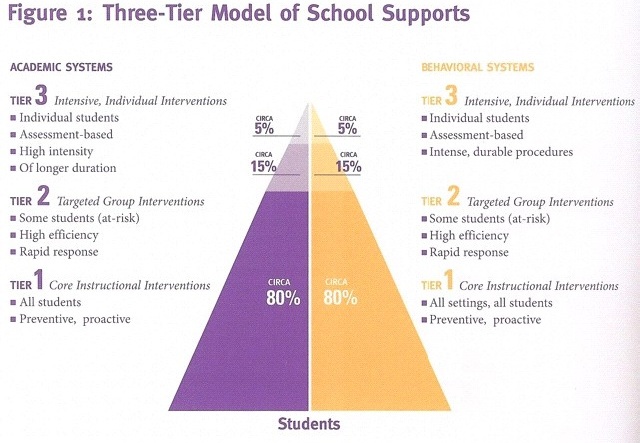
David L. Edyburn. Response to Intervention (RTI) Is There a Role for Assistive Technology? (pdf) Special Education Technology Practice Jan/Feb 2009 15-19.
Response to Intervention (RTI) Is there a Role for Assistive Technology (html)
David L. Edyburn. (2010) ISTE CommunityNING discussion: Response to Intervention (RTI), Universal Design for Learning (UDL), and Assistive Technology (AT): How to Connect the Dots
From Special Educational Technology Practice:
Quotes from Dave Edyburn:
"My concern is that the AT field is not really at the table in these discussions. And, as we use RTI to collect more data-based evidence about student performance, neither AT or UDL is prepared to contribute to the discussion. I think this puts special education technology professionals at the margins.. Descriptions of RTI typically make little mention of technology. Unfortunately, this communicates a message that technology is not a core tool to be used when designing interventions within each tier.. Advocates of RTI typically have little experience with technology. As a result, technology is not routinely consider to be an essential tool when designing solutions for struggling students. Therefore, technology advocates will need to be much more aggressive to ensure that technology tools continue to be considered as part of the solution set for struggling students. Technology developers will need to become much more committed to creating products that collect data on student performance and generate reports that clearly communicate student progress."
David Edyburn's References:
Bradley, R., Danielson, L., & Doolittle, J. (2007). Responsiveness to intervention: 1997 to 2007. Teaching Exceptional Children, 39(5), 8-12.
Edyburn, D.L. (2007). Technology enhanced reading performance: Defining a research agenda. Reading Research Quarterly, 42(1), 146-152.
Edyburn, D.L. (2006a). Cognitive prostheses for students with mild disabilities: Is this what assistive technology looks like? Journal of Special Education Technology, 21(4), 62-65.
Edyburn, D.L. (2006b). Re-examining the role of assistive technology in learning.Closing the Gap, 25(5), 10-11, 26.
Edyburn, D.L. (2006c). Failure is not an option: Collecting, reviewing, and acting on evidence for using technology to enhance academic performance. Learning and Leading With Technology, 34(1), 20-23.
Hoover, J.J., & Patton, J.R. (2008). The role of special educator in a multitiered instructional system. Intervention in School and Clinic, 43(4), 195-202.
TPACK: Technological Pedagogical Content Knowledge
Information from the wiki:
"Technological Pedagogical Content Knowledge(TPACK), builds on Shulman’s idea of PCK, and attempts to capture some of the essential qualities of knowledge required by teachers for technology integration in their teaching, while addressing the complex, multifaceted and situated nature of teacher knowledge. At the heart of the TPACK framework, is the complex interplay of three primary forms of knowledge: Content (CK), Pedagogy (PK), and Technology (TK). See Figure."
Key Papers about TPACK:
Mishra, P., & Koehler, M. J. (2006). Technological Pedagogical Content Knowledge: A new framework for teacher knowledge. Teachers College Record. 108(6), 1017-1054.
Koehler, M. J., & Mishra, P. (2008). Introducing Technological Pedagogical Knowledge. In AACTE (Eds.). The Handbook of Technological Pedagogical Content Knowledge for Educators. Routledge/Taylor & Francis Group for the American Association of Colleges of Teacher Education. for a copy: punya@msu.edu
Punya Mishra's Website
PRESENTATIONS
Developing a Game-based Learning Environment in Classrooms: A Conceptual Model Wen-Hsiung Wu, National Kaohsiung University of Applied Science, Taiwan; Wei-Fan Chen, The Pennsylvania State University, USA
“Bit by Bit Putting it All Together” How a Holistic View of Assessment Changed Our Perception of the TPACK Framework Colleen Sexton, Governors State University, USA; Michael Gordon, Governors State University, USA; Kathleen Hickey, Governors State University, USA
Testing a TPACK-Based Technology Integration Assessment Rubric Judi Harris, College of William and Mary, USA; Neal Grandgenett, University of Nebraska at Omaha, USA; Mark Hofer, College of William and Mary, USA
Figg, C. & McCartney, R. (2010). Impacting academic achievement with student learners teaching digital storytelling to others: The ATTTCSE digital video project. Contemporary Issues in Technology and Teacher Education, 10(1).
Archambault, L, and Crippen, K. (2009) Examining TPACK Among K-12 Online Distance Educators in the United States CITE: Contemporary Issues in Technology and Teacher Education.
Schmidt, D.A., Baran, E., Thompson, A. D, Koehler, M.J., Mishra, P, and Shin, T. Survey of Pre-service Teachers' Knowledge of Teaching and Technology. (March 3, 2009).
So, H.-J. & Kim, B. (2009). Learning about problem based learning: Student teachers integrating technology, pedagogy and content knowledge. Australasian Journal of Educational Technology, 25(1), 101-116. Available online at http://www.ascilite.org.au/ajet/ajet25/so.pdf
Presentation:
TPACK as Shared, Distributed Knowledge Hæge Nore, Akershus University College, Faculty of Technical and Vocational Teacher Education, Norway; Kirsti L. Engelien, University of Oslo, Department of Teacher Education and School Development, Norway; Monica Johannesen, Oslo University College, Faculty of Education and International Studies, Norway
From the TPACK WIKI:
SOMEWHAT RELATED
Larry Cuban on School Reform and Classroom Practice (Blog)
A "Naked Truth" about Technologies in Schools
Dr. Edyburn's 2007 Map of the Special Education Technology Literature
Topics: Trends and Issues, Assistive Technology, Professional Development, Instructional Design, Access for Diverse Populations, Technology and Instruction, Access for Diverse Populations, Historical/Policy/Legal