Monday, February 25, 2013


Friday, May 18, 2012
TED-Ed videos, website, offer interesting tools for learning and teaching
Information from the TED-Ed website:
"TED-Ed's videos aim to capture and amplify the voices of the world's greatest educators. To achieve this, we pair extraordinary educators with talented animators to produce a new library of exceptional educational videos. This website, similar to TED.com, is ever-evolving and we depend on you, the TED community, to nominate inspiring teachers that have touched your life or clever animators who have the skills to bring a gifted teacher's lesson to life." -TED-Ed
Below is the TED-Ed Website Tour introductory video:
RELATED
TED-Ed|Lessons Worth Sharing (website)
Flipped Learning Network
"Flipped learning happens when the teacher’s lecture is delivered outside of the traditional class time, via a video students view on their own as homework. Class time is used for active problem solving by students and one-to-one or small group tutoring with the teacher. Students can watch the short lectures as many times as they wish to grasp the content and then come to class ready to jump into the lesson, answer questions, work on collaborative projects, and explore the content further. Teachers are embracing Flipped Learning in elementary and secondary schools for all disciplines" -Flipped Learning.
Cross posted on the Interactive Multimedia Technology blog.
Sunday, February 05, 2012
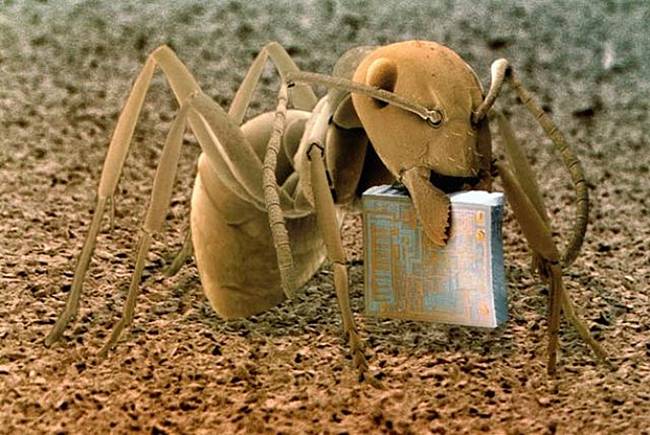
Microcosmos, by Brandon Broll: Awesome Scanning Electron Microscope Pics

The following photos were forwarded to me by my husband. I am not sure where they came from originally, but they are included in Brandon Broll's book, "Microcosmos: Discovering The World Through Microscopic Images From 20 X to Over 22 Million X Magnification"
An ant, Formica fusca, holding a microchipSurface of an Erasable Programmable Read-Only Memory silicon microchipEyelash hairs growing from the surface of human skinThe surface of a strawberryBacteria on the surface of a human tongueHuman sperm (spermatozoa)Nylon hooks and loops of VelcroHousehold dust: includes long hairs of cat fur, twisted synthetic and woolen fibers,
serrated insect scales, a pollen grain, and plant and insect remainsThe weave of nylon stocking fibersThe head of a mosquitoHead louse clinging to a human hairEight eyes (two groups of four) on the head of a tarantulaCut human hairs and shaving foam between two razor bladesCigarette paper the tobacco is rolled inCorroded surface of a rusty nailMushrooms sporesClutch of butterfly eggs on a raspberry plantCalcium phosphate crystalNo wonder modern forensics solves so many crimes.





Friday, October 28, 2011
Quick Link: 60 Minutes Segment -iPads and Autism Segment
http://www.cbsnews.com/video/watch/?id=7385686n
Saturday, September 10, 2011
Update; iGaze a[[ bu Dunedin Multimedia, good for group social skills activities
So what am I up to now?
I'd like to share with my readers that I've decided to continue in my present position as a school psychologist, while still devoting a portion of my free time to technology. From time-to-time I think deep thoughts about usability, accessibility, and UX/Interaction related to off-the-desktop interactive multimedia applications running on screens of all sizes. I'm hoping to create a few multimedia experiments using HTML5 and JavaScript, and explore jQuery if and when I can find the time!
For the present school year, my main school is a program for students with more significant disabilities, including autism spectrum disorders. My second school is a magnet high school for technology and the arts, located on the same campus. I also consult throughout the district on cases involving students who have suffered traumatic brain injuries, as well as students who have multiple disabilities. I am thankful that I have a job in a school district that values 21st Century technology.
I'm looking forward to another technology-rich school year. I've spent some of the time I usually devote to blogging devoted exploring iPad apps instead. Since I'm new to the world of iPads, I'm still in discovery mode. What an adventure!
There are plenty of educational apps out there, and many of them are suitable for students with special needs. On the other hand, there is much room for improvement - across all iPad app categories. Since there is very little research about what makes up a killer app- or suite of apps- for students with special needs, experimenting with iPad apps is uncharted territory.
I made the decision to bring my personal iPad2 to work after I discovered a number of apps that I thought would be useful in my work as a school psychologist with students who have special needs, including autism spectrum disorders.
One of my intervention themes this year focuses on social skills. This is especially important for students who participate in our schools community-based job training program. I'm using some content from Unique Learning's transition materials, as well as on-line activities from Do2Learn's JobTips website, because my aim is to facilitate social skills that will be useful in a variety of job and community settings.
Although my main technology tool for working with groups is the SMARTBoard, I've found that using a combination of interactive whiteboard and iPad activities to be especially effective. I'm paving the way for more role-play activities in the future, and attempting to use technology to my advantage.
This past week, I used the iGaze app, created by Dunedin Multimedia, to help a group of high-school level students practice establishing and maintaining eye gaze, something that is difficult for most of them to demonstrate "in-person". I was amazed. Each student was excited to take his or her turn. Even more amazing? When each student took a turn, the other students looked at their eyes and faces. No one rocked or "stimmed". No one made noises. I observed several instances of joint attention, much to my delight.
I'm hoping I will be able to access the YouTube videos from Dunedin so I can use them on the SMART Board. It will be interesting to see how this plays out! I'm also planning to take a closer look at Dunedin Multimedia's emotion x app for the iPad.
RELATED
Screen-shot of iGaze for the iPad Dunedin:

SOMEWHAT RELATED
The SMART Table at my school was updated today - I'm looking forward to using it for some group activities, now that it is back in working order and has new applications loaded up and ready to go!
If you are interested in learning more about technology related to students with special needs, be sure to check out Kate Ahern's blog, Teaching Learners with Multiple Special Needs
Kate's post about the features of Unique Learning Systems.
Upcoming: more about tablets, interview with folks from Stantum, social-skills game-in-progress.....large displays in public spaces update....
Thursday, August 25, 2011
Songify for Instant Musical Social Stories?!
What is Songify? It is sort of like a reverse Karaoke. Whatever you speak into your iPad or iPhone's microphone is immediately transformed by the app into a song. Key phrases are repeated and integrated into the melody. The free app comes with a few songs, stripped of the words/singing. (There is an option to purchase additional songs through the App store.)

My first few attempts using Songify with students was to create personalized "All About Me" story-songs, in real time, during group activities in the classroom, with input from the students. I also created a few story-songs that focused on positive behaviors - following the rules, listening to the teacher, kind hands, waiting patiently, calming down, etc.
Although Songify was designed to transform the spoken word into music, I found that it worked nicely with I spoke in "sing-song". I experimented with variations of the following story/song:
"name" likes to go to school, he/she likes to go to school, get on the bus and go to school...
"name" is so cool, "name" is so cool...
"name" likes to see my friends at school..
"name" likes to........ "name" likes to.. (play with friends at recess, learn about animals and their habitats, go to music class... wear cool shoes... etc.)
"name" likes to go to school
The students had a chance to share information about what they like, what they like about school, and so forth. Most had no problem participating for a 30 minute session!
Comments
I can see quite a few uses for the app:
- Use students' Songify creations as the narrative to digital social stories. This might be impressive on the SmartBoards - with the music coming from nice speakers rather than the small iPad.
- Use the Songify creations as part of other group or class digital projects. (Remember School House Rock?)
- Use Songify to create digital social stories for "on-the-job" routines and social skills.
The beauty of Songify is that it is simple to use- and it provides immediate, awesome feedback to the students. I have a hunch that if Songify is used in a variety of ways, the novelty effect might be sustained.
Cautions: If you work with students with significant special needs, you know how difficult it is to find activities and interventions that are effective - and also based on sound research. The reality is that with budget cuts, it is difficult to implement interventions designed for classrooms with a higher adult-to-student ratio. Technology can help, but iPad technology is new. It is highly unlikely that someone is researching the use of applications like Songify with students with special needs!
Reflection: I'm happy to have all of this technology at my fingertips. Unfortunately, my digital life in my role as a school psychologist is far from seamless or "integrated". Even the iPad2 requires a lot of work to create, move, share, and display content. Mark Weiser would rolling in his grave.
Digital Stories in Schools and for Special Needs Children
LIS 5315 Course Wiki
Songify
SmartApps for Kids: a Dad's quest to find the best applications for the iPad and iPhone, 8/4/11
khu.sh: Intelligent Music Applications
"Khush Inc. develops intelligent music applications for mobile phones. The company was founded by music technology enthusiasts at the Georgia Tech Music Intelligence Lab."
Songify makes your speech into song, sort of
Rafe Needleman, Rafe's Radar, CNET News, 7/7/11
SOMEWHAT RELATED
Wednesday, August 24, 2011
Thursday, August 18, 2011
Awesome Videoclip: AAC (augmentative and alternative communication) Technology at Summer Camp (via Kate Ahern)
Monday, August 15, 2011
Quick Links: Resources for Universal Design for Learning (UDL)
Universal Design for Learning, Version 2.0
Presentation: Universal Design for Learning (Stephanie Richardson)
Website/Wiki: UDL Technology Toolkit (Karen Janowski)
CAST: Transforming Education through Universal Design for Learning
Book: A Practical Reader in Universal Design for Learning
(David H. Rose and Ann Meyer, Eds)
Saturday, August 13, 2011
Resources for Transition and Job/Employment Supports for Young Adults with Autism Spectrum Disorders (work in-progress)
There are many challenges. From what I can tell, community programs designed to support young adults with autism spectrum disorders (ASD) have not been established at the level required to serve the upcoming "boomlet" that will no longer be eligible for support from public school systems. There is a need for more vocational rehabilitation counselors and job coaches who have extensive training and experience working with young people with ASD.
If this is a topic that interests you, take the time to read the following paper:
Scott Standifer, Ph.D. This document, in my opinion, is must-read for parents, educators, community job support professionals, VR counselors, etc.
The reality?
Most existing programs and services for adults with significant disabilities were established when the numbers of youngsters with autism spectrum disorders (ASD) were low. At the same time, funding for existing programs has been reduced in many communities across the U.S. Job-skills training and employment opportunities are rare, given our current economic climate and the fact that a high percentage of non-disabled adults are unemployed.
In my opinion, advocacy is part of the solution. Parents, caregivers, guardians, and educators to become better-informed about what transition resources are currently available in their own communities. Perhaps more important is to learn about successful programs in other counties, regions, or states. How was the program established? How is the program funded? If the program was established in collaboration with a university or community college, find out about it and share the information with university/community college leaders in your area.
The power of the web and digital media:
Although the number of "hands-on" programs might be disappearing, the Internet has the potential to provide a wealth of resources and a means for parents of young adults with disabilities to connect and share across regions.
To do my part for advocacy, I've started collecting resources related to transition for students with significant disabilities, including autism. I will post these resources in a couple of months and welcome input from my readers.
In the meantime, I'd like to share a couple of website that I'm adding to my resource list.
Do2Learn's JobTips
The folks from Do2Learn have created the Job Tips website, "designed to help individuals with disabilities such as autism spectrum disorder explore career interests, seek and obtain employment, and successfully maintain employment".
Although I found the site a bit difficult to navigate, it was worth taking the time to explore. It includes extensive information about various jobs and careers, an on-line interest survey, social skills assessments, examples of job-specific environmental demands, and strategies for getting and keeping a job.
Although some of the material is suitable for higher-functioning students with disabilities, there is plenty that can be used with students who have developed some basic job-task skills but have not yet developed the appropriate communication, coping, or social skills required for most workplaces.
On the site, I found a good number of video modeling clips for "on-the job" social and coping skills, something that I'm focusing on during group activities with the students I work with at Wolfe school. I used some of the activities on the SMARTBoard with students last week, with success. What I really would like is a "serious game" related to on-the-job social, coping, and conversation/ communication skills. (It is possible that this wish might come true - stay posted for more information!)

Jobs4Autism
The following information was taken from the Jobs4Autism website, a "resource of job success and job failure stories for individuals with autism, their family members, job coaches and caregivers. It allows everyone to share job ideas and help find long-term employment opportunities for those with autism."
Job4Autism was initially a collaborative project among four undergraduate students at the University of Notre Dame, guided by Professor Khalil Matta. The project was taken over by NameStormers, as one of the company's founders is the parent of a young adult with ASD.
RELATED
Posted for your convenience is a list of some of the links related to Jobs4Autism, from the NameStormers website. I've added some descriptive information for some of the resources. Below this section are other related resources.
Autism Transition Handbook (Online)
Jobs4Autism Facebook Page
CNN: 10 sites worth checking out if your child has autism
Jennifer Bixler, John Bonifield, CNN, 4/1/10
Temple Grandin's TED Talk: The world needs all kinds of minds
"Temple Grandin, diagnosed with autism as a child, talks about how her mind works -- sharing her ability to "think in pictures," which helps her solve problems that neurotypical brains might miss. She makes the case that the world needs people on the autism spectrum: visual thinkers, pattern thinkers, verbal thinkers, and all kinds of smart geeky kids."
Community Services for Autistic Adults and Children (Maryland)
Apiritech
"...a non-profit organization with a mission to provide a path for higher-functioning individuals on the Autism Spectrum to realize their potential through gainful employment"
Susan Senator, Author, Consultant, Mother of a young adult with ASD
Amelia Starr, Author, Consultant, Mother of a young adult with ASD
Lettuce Work Foundation (Ohio)
"The Lettuce Work Foundation is a non-profit 501c3 charity dedicated to serving young adults with autism and training them for the future. Our goal is to build a fully-operational, self-sustaining commercial greenhouse business that provides school-to-work transition services, job training and employment opportunities for young autistic adults in a professional work environment."
NC RESOURCES
Autism Society of North Carolina
Autism Society's Transition to Adulthood Guidelines (pdf)
ASMC Supported Employment, Mecklenburg County, NC
TEACCH Supported Employment for Adults with Autism
TEACCH Types of Supported Employment Jobs
TEACCH Supported Employment Models
The Arc of North Carolina: Supported Employment Info
The Arc of Union County: Employment Services
OTHER
Vocational Rehabilitation Service Models for Individuals with Autism Spectrum Disorders Project
Current Trends in Autism Employment (pdf)
Scott Standifer, MU Disability Policy & Studies
Autism Works National Conference, March 3 & 4, 2011
"Nationally, the number of people with Autism applying for vocational rehabilitation services increased 300% from 2003 to 2008."
More to come!
Friday, August 05, 2011
BlogHer '11: Topics include technology& parenting, moms as chief home CTOs, social media for social good, and more!
If I was at the BlogHer '11, I'd probably attend the track sponsored by Verizon, Parenting Magazine, and BlogHer: "The Tie that Binds Parents and Child", a topic that explores the use of technology by mom and kids.
The following chart is from an AdAge article about the above presentation:
"Start of the Day: 25% of Toddlers Have Used a SmartPhone" Matt Carmichael, AdAgeStat, 8/4/11

Saturday, July 09, 2011
"RISE AND SHINE": TED talk video by Simon Lewis about his recovery from a serious brain injury, and how technology helped.
Simon Lewis was in an automobile accident that resulted severe injuries to his body, including a very severe head injury that left him in a coma. As a result of his experience, he wrote a book, "RISE AND SHINE", covering his journey over 15 years of recovery and regeneration. In the book, Lewis shares what he learned along the way, and how cutting edge technology and some non-traditional thinking helped him move forward.
Simon Lewis had the opportunity to discuss his journey at a TED partner event in India in December, 2010. The following video of his talk is about 22 minutes long, but worth taking the time to watch. A variety of visuals are used to illustrate his journey and the research he did along the way. Near the end of the video, Simon Lewis demonstrates some of the technologies that he wears that supports his functioning.
Here is the blurb about the book from the Borders website:
"An impassioned tale of survival and recovery, this inspirational story recounts the author’s horrific car accident, his subsequent coma, and the more than 15 years of cutting-edge treatments and therapies endured during convalescence. With specific details of the rigorous rehabilitation process that ensued, including numerous breakthrough and experimental surgeries, the book also provides practical insight into navigating the treacherous world of insurance and how to differentiate between the often conflicting medical opinions offered. In addition to describing the numerous procedures undergone, the author tells not only of his pain, frustration, and despair, but also of his childlike wonder at the beauty and miracle of creation. A first-person account of sudden, unexpected tragedy and life-affirming courage, this remarkable tale of regeneration imparts lessons both medical and spiritual."
The Rise and Shine website includes many of the graphics used in Simon's video, and is worth taking some time to explore. Some of the graphics are interactive. (Since the website relies on Flash, it won't work if you try to access it using an iPad.)
Comment: As a school psychologist with additional training in neuropsychology - specifically assessment and intervention for children and teens who have experienced traumatic brain injury (TBI), this topic is important to me. I'm watching the video a second time, and I plan to read his book.
(Cross-posted on the Interactive Multimedia Technology blog.)
Sunday, May 08, 2011
"Mining the Imagination from Time Travel to Anti-Gravity" - Allison Druin's Workshop Keynote: CHI 2011, Vancouver, Canada
- Rethinking the meaning of interaction- well beyond the mouse, beyond the icon
- Rethinking our relationships we have with our technologies
- Rethinking how to transform technology
- Rethinking ho transforming technology can change learning, to really change the future...
The researchers look at what children are doing today, in homes and in schools. More recently, children's use of search at home, away from the eyes of their teachers.
How do we figure out how designs and ideas become new technologies?
Here is one example:
Story kit is a freely available app for the iPhone that can be used as a prototyping tool. Kids are asked to design music and create what it might sound like. It is considered to be a "mid-tech" tool, and supports creativity in the design process.
Three things that will happen in the future, according to Druin:
- Technology Ecology - apps are cross platforms and technologies. Where ever kids are and need it (tech agnostic)
- Physical/Virtual Switching --- interaction "bursts". Designing for an activity that can be interrupted, in a good way.
- Creation of new neighborhood for learning. A blur between the local and the global, "Local 2.0", beyond the walls. Technologies need to accept this, and embrace this.
Allison's inspiration comes from her many years of working with children in innovative and creative ways.
RELATED
From the Q and A:
Kids now know that technology rapidly changes.
Kids continue to be creative.
Kids seem to be more confident in their creativity, and that it matters.
Kids aren't given enough opportunities to be creative these days, given all of the testing that they endure at school.
There is a feeling that anything is possible....it does happen.
LINKS
Children as Design Partners
Workshop Website
CHI 2011 Workshop Program and Related Links: UI Technologies ant Impact on Educational Pedagogy, Related Child-Computer Interaction Papers and Courses
Cross-posted on the Interactive Multimedia Technology blog
Thursday, May 05, 2011
CHI 2011 Workshop Program and Related Links: UI Technologies and Impact on Educational Pedagogy, Related Child-Computer Interaction Papers and Courses
Below is the program for a workshop I've helped to organize, along with a few related presentations and events that will take place during the course of the conference.
WORKSHOP PROGRAM
CHI 2011 will be held at the Vancouver Convention Centre in Vancouver. The UI Technologies and Pedagogy workshop will be held on Saturday, May 7th, in the West Building, Level 1, Room 119/120. PDF versions of the following presentations can be found on the workshop's website.
9:00am – 09:05am Introduction
Edward Tse and Johannes Schöning
9:05am - 10:05am Paper Session I (8 min presentation, 4 min Discussion)
Chair: Yvonne Rogers
Evaluating Pervasive Classrooms
• Son Do-Lenh et al.: Classroom-experience evaluation: An ecological approach to evaluating pervasive technologies in classrooms
• Kathryn Rounding et al.: Evaluating Interfaces with Children
• Dan Morris et al.: Using Machine Learning to Scaffold Artistic Creativity in Education
• Tamara Polajnar et al.: Enabling Picture-based Querying and Learning with the JuSe Interface
• Hamed Alavi et al.: Lantern 2.0: A Pervasive Scripting Tool
•Quincy Brown et al.: Mobile Natives: Unlocking the Potential of Educational Technology
10:15am - 11:00am Coffee Break and Preparation time for short talks
11:00am - 12:10pm Paper Session II (8min presentation, 4min Discussion)
Chair: Max Mühlhäuser
Collaboration in Math: Fears, Myths, and Insights.
• Nicola Yull et al.: Pass the iPad: Comparing collaboration on paper and screen
• Veronika Irvine et al.: Math Education: A Creative Approach
• Group talk: Math and Embodied Agents
a.Kristina Richter et al.: Bridging Diagnosis and Learning for Mathematics Education in Classroom Setting
b.Lisa Anthony et al.: Handwriting Interaction for Math Tutors: Lessons for HCI in Education
c.Andrew Jensen et al.: Using Embodied Pedagogical Agents and Direct Instruction to Augment Learning for Young Children with Special Needs
• Group talk: Dispelling Myths About the Next Generation Classroom
a. Alex Thayer et al.: The Myth of the Paperless School: Replacing Printed Texts with E-readers
b.Sharon Oviatt: Designing Digital Tools for Thinking, Adaptive Learning and Cognitive Evolution
c.Alexandra Dunn et al.: Designing Classroom Technology to Meet the Needs of All
• Group talk: Games, Wearables and Fun Learning.
a.Christiane Moser et al.: Child-Centered Game Development
b.Lizbeth Escobedo et al.: Blue’s Clues: An Augmented Reality Positioning System
c.Si Jung Kim et al.: Wearable Story: A Story Telling Jacket for Young Children to Improve Their Independent Physical and Learning Activities
12:10pm - 1:30pm Lunch
1:30pm - 2:30pm Paper Session III (8 min presentation, 4 min Discussion)
Chair: Richard Beckwith
Tangibles and Tabletops
• Izdihar Jamil et al.: Communication Patterns in Collaborative Peer Learning around Interactive Table
• Aura Pon et al.: Graspable Music and Vuzik: Music Learning and Creativity using an Interactive Surface
• Ahmed Kharrufa et al.: Learning at interactive surfaces and designing for reflection
• Cristina Sylla et al.: TOK – a Tangible Interface for Storytelling
• Group talk: Tables and Tangibles
a.Robert Sheehan: Constructionism, Programming and Touch Interfaces
b.Orit Shaer et al.: Making the Invisible Tangible: Learning Biological Engineering in Kindergarten
c.Sebastien Kubicki: Evaluation of an interactive table with tangible objects: Application with children in a classroom
d.Cristina Emilia Costa et al.: I-Theatre: developing narratives skills in kindergarten children
e.Wooi Boon Goh et al.: Potential Challenges in Collaborative Game Design for Inclusive Settings
2:30pm - 3:00pm Coffee Break
3:00pm - 4:00pm Breakout Discussion (What are future challenges? Next years workshop?)
4:00pm - 4:45pm Closing Keynote by Allison Druin: Mining the Imagination from Time Travel to Anti-gravity: The Future of Child-Computer Interaction
"If you’ve ever sat with a child imagining the future of new technologies, you will undoubtedly hear about “anti-gravity machines,” “peace-technologies that work by tickling people,” “backpacks of the future with ice cream makers,” and “time-travel-mobile-phones that when you call someone it takes you back in time.” The question is how can these child-like imagined technologies lead us to real answers for the future?
In my talk I will propose that “data mining” is not enough, that “mining the imagination” is critical to understanding the future. I will describe the “iChild” and the interactive, independent, international, imaginative child we need to consider designing for in the future. If we look for real change, we need to listen to children, not because they know more, but because they can help us question, explore, and push us in true directions for change."
Allison Druin is an Associate Dean for Research in the iSchool at the University of Maryland and is Director of the Human-Computer Interaction Lab. For almost 14 years, she has led an intergenerational research team, where children, ages 7-11 years old partner with an interdisciplinary group of adult researchers to develop new technologies for children. With this team, she has helped to developed new digital library and storytelling tools with such partners as the U.S. National Park Service, Sesame Workshop, Nickelodeon, Nokia, UNICEF, and many others. In 2010, she received with Ben Bederson the SIGCHI Social Impact Award for her work leading the International Children’s Digital Library (www.childrenslibrary.org).
4:45pm - 5:00pm Closing Remarks (All)
7:00pm Optional Workshop Dinner
RELATED CHILD-COMPUTER INTERACTION SESSIONS AT CHI 2011
CHI 2011 will be offering a variety of opportunities for people interested in interaction design and technologies for children. Detailed information regarding the researchers/ presenters can be found on the IDC-SIG News/Events page.
CHI2011 COURSE - Evaluating Children's Interactive Technology
Monday 9th May 2011 - 16:00
Janet C Read - University of Central Lancashire
Panos Markopoulos - Technical University of Eindhoven
CHI2011 COURSE - New Methods for Designing for and with the iChild: Strategies for Today’s Mobile, Social, and Internet Technologies
Thursday 12th May 2011 - 09:00
Allison Druin - University of Maryland
Jerry Fails - Montclair State University
Mona Leigh Gubler - University of Maryland
CHI2011 Paper Session - Engaging Youth Thursday 12th May 2011 - 11:00
Exploratory Evaluations of a Computer Game Supporting Cognitive Behavioural Therapy for Adolescents
In the Mood: Engaging Teenagers in Psychotherapy Using Mobile Phones
Breaking Boundaries: Strategies for Mentoring through Textile Computing Workshops
Brick by Brick: Iterating Interventions to Bridge the Achievement Gap with Virtual Peers
CHI2011 - Other IDC Related Papers
Paper Session: Art, Music and Movement: Monday 9th May 2011
MOGCLASS: Evaluation of a Collaborative System of Mobile Devices for Classroom Music Education of Young Children
MoBoogie: Creative Expression Through Whole Body Musical Interaction
Paper Session: Low-cost ICT4D Tuesday 10th May 2011
Utilizing Multimedia Capabilities of Mobile Phones to Support Teaching in Schools in Rural Panama
Infrastructures for low-cost laptop use in Mexican schools
Paper Session: Storytelling and Perceptual Crossing Wednesday 11th May 2011
ShadowStory: Creative and Collaborative Digital Storytelling Inspired by Cultural Heritage
Paper Session: Learning
Practical, Appropriate, Empirically-Validated Guidelines for Designing Educational Games
If these topics interest you, consider making plans to attend IDC 2011!
IDC 2011: The 10th International Conference on Interaction Design and Children
June 19-23, University of Michigan
Cross Posted on the Interactive Multimedia Technology blog.


