Thursday, November 10, 2011


Wednesday, August 24, 2011
Monday, October 18, 2010
Physicsgames.net: Physics games for interactive whiteboards and touch screens that you can embed on your website!
I have collected lots of resources for interactive whiteboards and other touch-screens, such all-in-one Touch PC's such as the Dell and HP TouchSmart. Some are optimized for use on mobile devices such as the iPhone, iPad, and Droids.
I'd like to highlight a few online interactive educational games on this blog from time-to-time.
The PhysicsGames site is full of games that can be embedded into a blog or web page, making it easy for teachers and parents to organize and arrange the games as they see fit. This feature also lets students do the same.
On the main page of the website, the games are arranged in alphabetical order, with picture icons for each game. The titles of the games and the pictures on the icons give you a quick idea of what each game is about. The games were created by a variety of developers, professionals, teachers, and if I'm not mistaken, tech-savvy students.
Below are links to the various categories of physics games found on the site. The games I explored all had music and sound effects, so make sure that the sound is turned on! (Note: The site is supported by sponsors, but the advertising is not annoying-in many cases, you can skip the ads.)
Featured | All | Block Removal | Construction | Demolition | Platform | Projectile | Stacking | Othe
Cross-posted on the Interactive Multimedia Technology blog.

Tuesday, August 03, 2010
"Cute Doggies" Photo-Globe Mash-up using Google Earth and a Flickr Set (How-to)
If you have access to an interactive whiteboard, such as a SMARTBoard, and want to try something a little different, you might want to try your hand at creating a themed-based "mash-up" for students. The photo below is a screen shot of photos of just about every dog I know, and some that happened to cross my path. In this post, I'll share some information about how to create a photo-globe in Google Earth. I'll post a "how-to" video in the future.

The first step is to make sure you have lots of pictures related to your theme uploaded to a site such as Flickr. (You can also create a photo-globe using pictures from your computer's hard drive.)
To get the pictures into Google Earth, I used the Image Overlay feature, and in the "link" textbox, I entered the image URL for each picture that I'd previously loaded as a set in Flickr.
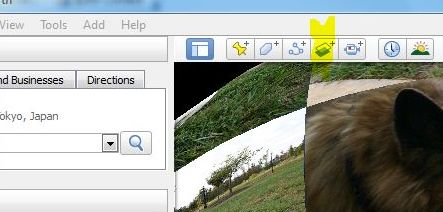
To do prepare for this, make sure you go to "view" tab on the upper left-hand section of your screen, and make sure that "toolbar" is checked. Also make sure that "Grid" is selection, as this will help make it easier to arrange and align your pictures. You can turn off this feature later. Near the top of the screen, click on the Image Overlay icon. (I've highlighted it in the picture.)

You'll have to enter the URL of the image you'd like to add to the globe in the "Link" textbox, which I've highlighted in the above picture. In this case, I've used a link to one of my pictures in a Flickr set I created for this project.
One thing to keep in mind is that the picture will take up a much larger space than you might prefer, so you'll have to adjust the size using the green markers:

The following directions are from the "Positioning the Imagery in the Viewer" section in the help section:
- Use the center cross-hair marker to slide the entire overlay on the globe and position it from the center. (Tip: do this first.)
- Use the triangle marker to rotate the image for better placement.
- Use any of the corner cross-hair markers to stretch or skew the selected corner. If you press the Shift key when selecting this marker, the image is scaled from the center.
- Use any of the four side anchors to stretch the image in or out of from the selected side. If you press the Shift key when doing this, the image is scaled from the center.
TIP: Try positioning the center of the image as a reference point first, and then use the Shift key in combination with one of the anchors to scale the image for best positioning.
In Flickr, to get the image URL, go to the "share this" tab above the picture you'd like to put on the globe. You need to select the one that says "Grab the HTML", as shown below:

Select ONLY the code that comes after "src=" and before "width".
Then repeat. You can add place-marks that contain URLs that link to additional information about the subject of a picture, such as blog posts with embedded videos and/or text related to a picture, and so forth.
The process of building a photo-globe in Google Earth is a bit tedious. If someone has a short-cut to share, please let me know!
TAG GALAXY - A "shortcut":
If you have a burning desire to create a quick photo-globe using random pictures, you see what the Tag Galaxy has to offer. Enter "dogs" or whatever theme you want for your photo-globe, and in an instant, it will be created from publicly available pictures from Flickr. The application uses the Flickr API.
Here is an example of a "Dog" Tag Galaxy:

Here is the slideshow from the pictures selected for the photo-globe:
Why is this important to me?
The students at one of my schools started back last week, due to the school's "year-round" schedule. The students in this program have multiple special needs, including severe autism, and most learn best through visual and multimedia representations of information. I devote some of my spare time creating interactive content for the students, and I thought this might work out nicely.
To address the student's special learning needs, a number of new SMARTBoards were recently installed at the school, and now every classroom has an interactive whiteboard, including the room I usually use with students. We also have a few Dell Studio One All-in-One touch screen computers and a multi-touch SMARTTable. Interactive multimedia content works nicely on these screens! (I'm planning on making a "how-to" video when I get the chance.)
RESOURCES
Google Earth
Flickr
Programmable Web (My hunch is that this site might provide some information about shortcuts for creating a photo-globe in Google Earth.)
(Cross posted on the Interactive Multimedia Technology Blog)
Friday, April 09, 2010
Cool iPad App for Speech and Language Therapy! (Video demo via Eric Sailer and Jason Rinn)
Eric Sailers, a speech and language pathologist and assistive technology specialist, has developed ArtikPix, an articularion applicaton for the iPad, along with Jason Rinn.
The application is free, and there are options to purchase additional levels for use. Here is the video demo:
Eric Sailer's Blog:
Speech and Language Pathology Sharing
Jason Rinn's Website:
RinnApps: Mobile Apps for Educators and Parents
Saturday, August 16, 2008
Microsoft Surface's Hotel Concierge Application: Let's see an affordable Surface, deployed in classrooms and libraries!
Take a look at the video of Microsoft's multi-touch "Surface", functioning as an interactive, electronic hotel concierge. Imagine how multi-touch, multi-user technology could be used in education!
Cross posted from the Interactive Multimedia Technology blog
Monday, February 25, 2008
Technology Review: "Bill Gates says Microsoft is pushing touchscreen and speech technology to replace keyboards"
"Bill Gates says Microsoft is pushing touchscreen and speech technology to replace keyboards" is the headline from an article in the 2/22/08 MIT Technology Review.
Imagine what this will do to pave the way for Universal Design for Learning!
Some form of keyboard-related input will be needed until speech, gesture, haptic, and motion tracking technology is refined a bit.
Sunday, February 03, 2008
Update: So you're getting interactive whiteboard! Now what?

(photo from http://www.nextwindow.com/)
If you hadn't noticed, there is an increase in the number of classrooms that have interactive whiteboards or displays. My school will have two whiteboards soon. To prepare for the transition, teachers are searching for information beyond what is provided by SmartTechnologies or Promethean, two industry leaders.
I've mentioned in previous posts that I tried out a variety of interactive whiteboards and large touch-screen displays when I worked on a project for a Human-Computer Interaction class I took in 2007. My favorite was the NextWindow Human Touch display, which contains WiFi and BlueTooth enabled computer. The display stays well calibrated, has a high resolution, and has excellent touch response. It does not require a projector, so shadows aren't cast when people are at the screen, which is formally known as the "problem of occlusion".
Fortunately, there are resources on the web to help teachers learn more about the various ways they can harness the power of interactive technology to support innovative, effective teaching and learning.
I came across this link, posted in Langwitches recent blog entry, Interactive Whiteboards: Which? How? What? that is suitable for beginners:
Thirty-Two Interesting Ways (and tips) to Use Your Interactive Whiteboard
Another good source , from the Georgia Department of Education's Educational Technology Training Center, is the Interactive Whiteboard Links
Here are some of my posts and links regarding interactive whiteboards and displays:
Nobelprize.org's Educational Outreach: Multimedia Games, Experiments, and Simulated Environments
Interactive Whiteboards Increase Student Attention, Engagement, and Test Scores!
Edusim: 3D Collaborative Application for Interactive Displays and Whiteboards
Explore Learning, Interactive Displays, Revisited
eSchool News Online: Microscope Imaging Station from the Exploratorium
Interactive Information Visualization: Digg Labs Website
Gigapan: Good for interactive whiteboards and large touch screen displays
Visual Simulations for K-12 Education: Great for interactive displays and white boards
Examples of interactive touch screen displays, on the Future-Making Serious Games blog:
http://elianealhadeff.blogspot.com/2007/09/ten-fingers-software-for-serious-gaming.html
For the technically inclined:
Johnny Lee's Wii Hacks
Video: Low Cost Multi-Point Interactive Whiteboard with the Wiimote
Scratch: A new programming language for kids that supports stories, animations, games, music, art, websharing, from MIT
RELATED:
Resource and Research List, "Interactive Whiteboards", from the National Clearinghouse for Educational Facilities (NCEF)
Education World article "Speaking of Electronic Whiteboards?"
Large Display Research Overview from Microsoft Research (PDF)
Quotes about visual and multimedia literacy, Part I
Quotes about visual and multimedia literacy, Part II
If you'd like to explore and discuss new technologies, join Classroom 2.0. There is a section about interactive whiteboards in the Classroom 2.0 Resources Wiki.
Thursday, December 06, 2007
Visual Simulations for K-12 Education- Great for interactive displays and white boards.
The Visual Simulations website provides a variety of educational applications designed to work with interactive whiteboards and displays. Most of the activities on the site are free.
AudioBoard:
"Pure tones can be visualized with an in-built signal generator. Alternatively you can use the microphone as an input or play a sound file in the background with media player."
AtomScope:
"AtomScope is a particle simulation program for teaching at KS3 and KS4. It features a collection of simulations which each reflect a key idea in the science of atoms and molecules."


Saturday, September 15, 2007
LucidTouch two-sided touch screen
If you are interested in hand-held or mobile technologies that have potential for use in education, take a look at my post about LucidTouch, a two sided touch screen that is in development through a collaboration between Microsoft, the University of Toronto, and Mitsubishi.
Sunday, July 29, 2007
Interactive whiteboards increase student attention, engagement, participation, and test scores!
More about interactive displays....
According to a press release from Smart Technologies, a study conducted in the UK and Europe during the years 2002-2006 found positive results regarding the use of interactive whiteboards in the classroom:
"The following outcomes were among its key findings: interactive whiteboard use results in improved student performance in national tests in English, math and science, compared to student performance without interactive whiteboards; digital content on interactive whiteboards is engaging, motivating, and students pay more attention during lessons; and interactive whiteboard use encourages greater student participation in the classroom."
There are several types of interactive large-screen displays available for use in educational settings, and there are several companies working on large touch-screen displays that could be adapted for use in schools, media centers, and public libraries.
(I prefer large-screen displays/interactive boards that do not rely on an external projector)
Resources:
Link to PDF of full report: "The ICT Impact Report: A Review of Studies of ICT Impact on Schools in Europe" (Anja Balanskat, Roger Blamire, Stella Kefala, European Schoolnet.)
Resource and Research List, "Interactive Whiteboards", from the National Clearinghouse for Educational Facilities (NCEF)
Education World article "Speaking of Electronic Whiteboards?"
Large Display Research Overview from Microsoft Research (PDF)
The following is a partial list of companies that make or sell interactive displays and/or whiteboards:
SmartTechnologies
NextWindow
Promethean
Mimeo
Accenture
NEC
Interwrite
For Teachers:
Lessons and Links for Interactive Whiteboard Classroom Activities
Online interactive whiteboard activities for primary classrooms (from Topmarks Education, UK)
SmartTechnologies lesson activities for the SmartBoard
National Gallery of Art Kids
PBS Kids
National Geographic Kids
NASA Kids
Discovery Kids
Music Tech Teacher (Includes online games and music learning activities)
Flash Music Games
(some games cam be downloaded)
I'll be posting more links on the Interactive Multimedia Technology website soon.
Saturday, July 28, 2007
Take a look at HP's TouchSmart PC

Photo from HP TouchSmart Website
Saturday, July 21, 2007
ExploreLearning Gizmos, Interactive Displays, Revisited

ExploreLearning recently earned a 2007 Distinguished Achievement Award from the Association of Educational Publishers for Best Science Instruction Website. ExploreLearning offers interactive math and science activities, known as "Gizmos", for students in grades 6-12.
I used some of the sample activities with a few struggling high school students two years ago, using an interactive whiteboard. The students were engaged and seemed to grasp concepts quickly.
Take the time to look at the information on ExploreLearning's blog, including the testimonial section. You can subscribe for a free 30-day trial for use in the classroom or at home. The teacher support materials, in my opinion, are excellent. Each math and science activity aligns with state curriculum guidelines, available on the site.
With new interactive touch-screen technologies, such as the iPhone, the NextWindow Human Touch interactive large-screen display, newer-edition interactive SmartBoards, and Microsoft's Surface, imagine the possibilities for students- once the price of interactive devices and hardware comes down to an affordable level.
I bet most students would not object to playing with science and math Gizmos via a web-browser on their iPhones!
RELATED RESOURCES/LINKS:
ExploreLearning's award press release.
Why Gizmos Work
The home page of theSmartBoard 2007 Blog, hosted by M.Gavel, a 6th grade teacher, has a list of links to on-line interactive learning websites that work well on the SmartBoard(and other interactive large-screen displays), such as StarFall, an engaging early literacy site.
Note:
Please leave me a comment if you know if there is any research about the effectiveness of ExploreLearning. Judging from the testimonials, this would be a great research topic for psychology, education, or educational technology graduate students!
Photo courtesy of ExploreLearning.
Saturday, July 14, 2007
Women in Technology: My editorial on the NCWIT blog
The above link is to my editorial, "Gender Beneath the Surface", posted on the NCWIT blog.
Although women make up half the population, they are under-represented in computer science and related technological fields. If your are interested in issues related to women and technology, the National Center for Women in Information Technology -NCWIT- is a great place to start.
I wrote the post on the day I learned that all of the members of the executive team for Microsoft Surface (Madrid) were male.
(dually posted - techpsych and interactive multimedia technology blogs)
Monday, May 21, 2007
Visit the Interactive Multimedia Technology blog
I've posted a few videoclips of the interactive projects I worked on last semester in my HCI and Ubicomp classes on the Interactive Multimedia Technology blog. The demos were designed for use on an interactive multi-touch table or large-screen display. Here is one example: "Poetry Picture Share", Version 1.


