Sunday, July 08, 2012

Learning as Identity Formation: Interesting presentation by Jochen Rick and Colleagues (video)


The above video is from a presentation from the recent ICLS 2012 conference, held in Sydney, Australia.


RELATED
Paper: "Learning as Identity Formation: Implication for Design, Research, and Practice"


Authors
Jochen Rick, Saarland University
Ben DeVane, University of Florida
Tamara Clegg, University of Maryland
Vanessa L. Peters, University of Michigan
Nancy Butler Songer, University of Michigan
Susan R. Goldman, University of Illinois
Cindy E. Hmelo-Silver, Rutgers University


Cross posted on the Interactive Multimedia Technology blog.

Friday, May 18, 2012

TED-Ed videos, website, offer interesting tools for learning and teaching

TED-Ed aims share the wisdom and knowledge of great teachers by providing educators with the opportunity to have their lessons transformed into videos enhanced by creative animators. The videos and lessons are available for learners all around the world, online.  I'll share more about the TED-Ed concept in a future post.


Information from the TED-Ed website:
"TED-Ed's videos aim to capture and amplify the voices of the world's greatest educators. To achieve this, we pair extraordinary educators with talented animators to produce a new library of exceptional educational videos. This website, similar to TED.com, is ever-evolving and we depend on you, the TED community, to nominate inspiring teachers that have touched your life or clever animators who have the skills to bring a gifted teacher's lesson to life." -TED-Ed


Below is the TED-Ed Website Tour introductory video:


RELATED
TED-Ed|Lessons Worth Sharing (website)
Flipped Learning Network
"Flipped learning happens when the teacher’s lecture is delivered outside of the traditional class time, via a video students view on their own as homework. Class time is used for active problem solving by students and one-to-one or small group tutoring with the teacher. Students can watch the short lectures as many times as they wish to grasp the content and then come to class ready to jump into the lesson, answer questions, work on collaborative projects, and explore the content further.  Teachers are embracing Flipped Learning in elementary and secondary schools for all disciplines"  -Flipped Learning.


Cross posted on the Interactive Multimedia Technology blog.

Saturday, March 24, 2012

Digital Media and Learning 2012: Video presentation and video of John Seely Brown's keynote

This is a video of students from Morningside, Crenshaw, Rosevelt, Locke, and Manual Arts high schools in L.A. who presented a session on Education for a Digital Democracy at the recent Digital Media and Learning Conference

What I especially like about this presentation is the way the students highlighted the current state of technology in their urban schools, and what they have to say about their schools' policies regarding the use of personal technologies during the school day.


Thanks to the School Library Journal and Scott McCloud for sharing this!

If you are interested in digital media/new media/multimedia and learning, take the time to view John Seely Brown's DML 2012 Keynote:
Cultivating the Entrepreneurial Learner in the 21st Century


RELATED
Douglas Thomas and John Seely Brown 

Cross-posted on the Interactive Multimedia Technology blog.


Sunday, March 11, 2012

Workshop on Digital Ecosystems for Collaborative Learning: Embedding Personal and Collaborative Devices to Support Classrooms of the Future


Workshop on Digital Ecosystems for Collaborative Learning:  Embedding Personal and 
Collaborative Devices to Support Classrooms of the Future


This workshop will be held in conjunction with ICLS 2012  (International Conference of the Learning Sciences) on July 2, 2012, in Sydney, Australia. The guest speaker in the introductory panel is Chia Shen, the SEAS Senior Research Fellow and Director for the SDR (Scientists' Discovery Room) Lab at Harvard University.

Call For Papers
Applications for the workshop must be submitted by May 1, 2012, and must include a paper of up to 4 pages, along with an optional video.


Topics of Interest (from the workshop website) 
Connection between technologies and co-located collaborative learning 
Usage of technology in the classroom 
Ubiquitous and mobile learning environments 
Multi-touch tables and surfaces, interactive whiteboards 
Motion sensitive interfaces, physical and tangible computing 
Multi-display, single-display groupware 
Educational uses of smart phones and tablets 
Classroom orchestration and monitoring 
Improving teacher support Integrating technology and pedagogical theory
Best practices for adaptation of technology to educational context

Numby App: Kids have fun while learning to count to 10, via CAN

Watch the video!


I've been meaning to post reviews about my favorite apps for kids, but there are so many that I love and use at work and when I'm with my little grandson, I haven't figured out where to begin!

I came across information about the Numby app on the Creative Application Network website, one of my favorite places to learn about creative, innovative applications and technologies. The app was created by Amit Pitaru and James Paterson.

RELATED
Creative Applications Network
Numbo Review:  Numby by Pitaru and Paterson, Learning counting in weird and wonky ways.
Filip, CAN, 7/3/12

SOMEWHAT RELATED
Rhonda, the 3D Drawing Tool, created by Pitaru and Paterson (set to an old Neil Young song)
Sonic Wire Sculptor: 3D musical sequencer (Zach Gage, Amit Pitaru, and team)
"Sonic Wire Sculptor was reworked for the iPhone with ofxIphone and openframeworks open source libraries. See more athttp://openframeworks.cc


Sunday, February 05, 2012

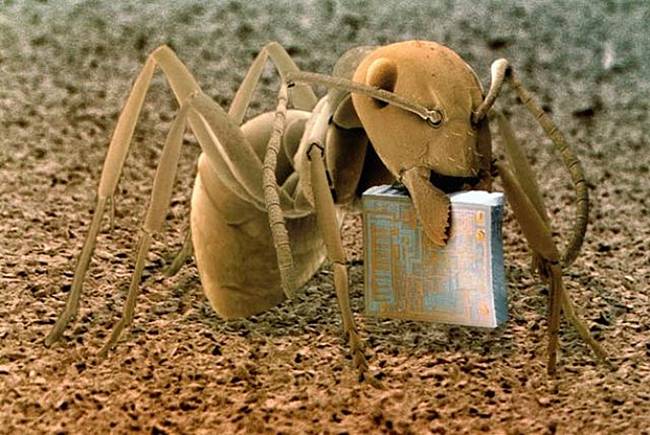
Microcosmos, by Brandon Broll: Awesome Scanning Electron Microscope Pics


  Microcosmos: Discovering The World Through Microscopic Images From 20 X to Over 22 Million X Magnification

The following photos were forwarded to me by my husband. I am not sure where they came from originally, but they are included in Brandon Broll's book, "Microcosmos: Discovering The World Through Microscopic Images From 20 X to Over 22 Million X Magnification"

http://n7qvc.files.wordpress.com/2011/02/image001.jpg
An ant, Formica fusca, holding a microchip

http://n7qvc.files.wordpress.com/2011/02/image002.jpg
Surface of an Erasable Programmable Read-Only Memory silicon microchip

http://n7qvc.files.wordpress.com/2011/02/image003.jpg
Eyelash hairs growing from the surface of human skin

http://n7qvc.files.wordpress.com/2011/02/image004.jpg
The surface of a strawberry

http://n7qvc.files.wordpress.com/2011/02/image005.jpg
Bacteria on the surface of a human tongue

http://n7qvc.files.wordpress.com/2011/02/image006.jpg
Human sperm (spermatozoa)

http://n7qvc.files.wordpress.com/2011/02/image007.jpg
Nylon hooks and loops of Velcro

http://n7qvc.files.wordpress.com/2011/02/image008.jpg
Household dust: includes long hairs of cat fur, twisted synthetic and woolen fibers,
serrated insect scales, a pollen grain, and plant and insect remains

http://n7qvc.files.wordpress.com/2011/02/image009.jpg
The weave of nylon stocking fibers

http://n7qvc.files.wordpress.com/2011/02/image010.jpg
The head of a mosquito

http://n7qvc.files.wordpress.com/2011/02/image011.jpg
Head louse clinging to a human hair

http://n7qvc.files.wordpress.com/2011/02/image012.jpg
Eight eyes (two groups of four) on the head of a tarantula

http://n7qvc.files.wordpress.com/2011/02/image013.jpg
Cut human hairs and shaving foam between two razor blades

http://n7qvc.files.wordpress.com/2011/02/image014.jpg
Cigarette paper the tobacco is rolled in

http://n7qvc.files.wordpress.com/2011/02/image015.jpg
Corroded surface of a rusty nail

http://n7qvc.files.wordpress.com/2011/02/image016.jpg
Mushrooms spores

http://n7qvc.files.wordpress.com/2011/02/image017.jpg
Clutch of butterfly eggs on a raspberry plant

http://n7qvc.files.wordpress.com/2011/02/image018.jpg
Calcium phosphate crystal
    No wonder modern forensics solves so many crimes.

Saturday, February 04, 2012

New iPad apps from Inclusive Technology!

I use resources from the HelpKidzLearn website by Inclusive Technology in my work at as a school psychologist at Wolfe School quite frequently.  The students who participate in the program at Wolfe have complex disabilities, including autism.    We have a growing number of younger students, and I've found the resources from Inclusive Technology to be a good fit.


Although many of the students can interact with the content  provided on the HelpKidzLearn website on SMARTboards, those who can't can do so using switches, as the website provides a range of switch-accessible activities.


I use my personal iPad at work, as does the program's speech and language therapist.  She recently downloaded several new apps developed by Inclusive Technology for the iPad.  I just purchased a few of the apps and think that they will be very useful in my work with students, especially during informal assessment of those who have limitations across most domains. 


Below is a video clip from Inclusive Technology that provides a nice overview of the apps, which are switch-accessible.  More apps for the iPad are in the planning stages.   This is great news!


RELATED
Inclusive Technology, UK Site
Inclusive Technology, US Site
HelpKidzLearn


Inclusive Technology has several items that provide students with disabilities access to iPads. Here are the links (US):
Big Grips Frame for iPad and iPad2
it-iClick-iPad Switch Interface
Inclusive iPad Mounts
Maxess Accessories
iAdapter for iPad
Blue2 Bluetooth Switch


Thursday, January 19, 2012

iPads: iTunesU App, iBooks Textbooks -- Oh, my!


There is a lot of buzz about iPads in education. 


I'm convinced that tablet technology will be adopted by schools at a faster rate than anticipated a year or so ago, now that Apple has launched iBooks Textbooks for iPad and the iTunesU app.


Parents, teachers, students, administrators, and school IT specialists, hold on to your hats!

RELATED
Learning Together: The Evolution of a 1:1 iPad Program
Carolyn Foote, Internet@Schools, 1/1/12
The Swiss-Army Knife of Education
Mr. Hooker, The WIFI--Eanes ISD iPad Pilot Project, 10/3/11
iPads in Education
John Evans, Curator
iBooks Textbooks
iTunesU App

iPad for Art: Sketchbook Express, via the Montlieu Academy of Technology, a public K-5 magnet school that adopted a 1:1 iPad initiative in August, 2011. 


COMMENT
I have been planning on devoting more posts in the future about the iPad and related interactive technologies for learning- and for fun.  When I have a chance to write my mega-post, you won't be disappointed!


Cross-posted on the Interactive Multimedia Technology blog.
Monday, January 16, 2012

GeekDads (and Moms with Apps)


GeekDad's Post: The Changing Nature of App Design for Kids (quick link)

The Changing Nature of App Design and Development for Kids
Daniel Donahoo, GEEKDAD, Wired,  1/16/12
"During 2011, I have observed a real push towards app development and digital design for children that is respectful and purposeful - not just a marketing and money making exercise." -Daniel Donahoo
I encourage you take the time to read Daniel Donahoo's thoughtful post!

RELATED
GeekDad Opinion:  We Need a Children's Apps Rating System
Daniel Donahoo, GEEKDAD, Wired, 12/11/10
Moms with Apps Workshop Summary
Moms with Apps, 12/4/11

Cross-posted on the Interactive Multimedia Technology blog


How To Use Game Dynamics In The Classroom   (Cross-posted on the Interactive Multimedia Technology blog)


Although the article refers to the work of Liz Gross and her colleague(s) focusing on the use of game dynamics in a large university lecture class, there are links to a variety of interesting resources and posts that address games in education across many settings. This work is part of a research proposal for funding from the Digital Media + Learning competition.


RELATED 
Digital Media and Learning Conference 
March 1-13, 2012
UC Humanities Research Institute University of California, Irvine 
About the Conference (info from the DML website)
"The Digital Media and Learning Conference is an annual event supported by the MacArthur Foundation and organized by the Digital Media and Learning Research Hub located at the UC Humanities Research Institute, University of California, Irvine. The conference is meant to be an inclusive, international and annual gathering of scholars and practitioners in the field, focused on fostering interdisciplinary and participatory dialog and linking theory, empirical study, policy, and practice. The third annual conference – DML2012 – is organized around the theme “Beyond Educational Technology: Learning Innovations in a Connected World” and will be held between March 1-3, 2012 in San Francisco, California."
Keynote: John Seely Brown 
Plenary Panelists: Eleizabeth CorcoranRenaldo LemosLeslie Redd, and Constance M. Yowell 
Conference Committee: 
Diana Rhoten, Conference Chair
Tracy Fullerton:   Re-imagining Media for Learning Chair
Antero Garcia:   Innovations for Public Education Chair
Mitch Resnick:   Making, Tinkering and Remixing Chair
Mark Surman:    Democratizing Learning Innovation Chair
Jess Klein:   Democratizing Learning Innovation Co-Chair 


Thanks to Yasmine Kasbi for sharing the post on Google+! 

Thursday, November 24, 2011

Mind/Shift Post: Read, Hear, or Create a Story: Apps for Traveling with Kids", plus a few interesting links!

Today is Thanksgiving, and one of the things I'm thankful for is the opportunity to share interesting ideas and links with readers of this blog! (Cross-posted on the Interactive Multimedia Technology blog.)


The following post was written by Tina Barseghian, who is an editor/blogger at KQED/NPR for the Mind/Shift blog. Mind/Shift  focuses on ideas and technology that will impact the future of how we learn.  
Read, Hear, or Create a Story: Apps for Traveling with Kids Tina Barseghian, Mind/Shift, 11/23/11

Link to other Mind/Shift post collections:
Children and Social Media
Tech Tools
Mobile Learning
Digital Divide
School Day of the Future


RELATED 

Boredom Busters: 50 Fantastic Play-and-Learn Apps, Sites, and Toys
Tina Barseghian, Mind/Shift, 6/17/11

Libraries and Museums Become Hands-On Learning Labs 
Audrey Watters, Mind/Shift, 11/23/11
"A new competition sponsored by the Institute for Museum and Library Services (IMLS) and the John D. and Catherine T. MacArthur Foundation has just announced 12 winning libraries and museums that will receive $1.2 million in grant money to help push the boundaries of what these institutions look like, specifically helping to create facilities that are  better "learning labs" for teens"
Lauren Britton Smedley (Transliteracy Development Director a the Fayetteville Free Library)
IDEO's Design for Learning (Sandy Speicher, Duane Bray, Rachel Switzky)
K12 Laboratory at D. School (Stanford)
Books Should Be Free
StorynoryStorynory iTunes Library:  Podcasted stories for children, offers a free audio story every week, has some online multimedia activities.


Friday, November 04, 2011

CALL FOR PAPERS: Educational Interfaces, Software, and Technology, ACM CHI 2012

CALL FOR PAPERS
EDUCATIONAL INTERFACES, SOFTWARE, AND TECHNOLOGY 2012
3rd Workshop on UI Technologies and Educational Pedagogy
May 5-6 2012
in conjunction with ACM-CHI 2012, Austin, Texas
This will be our third annual workshop in conjunction with CHI 2012.


One of the primary goals of teaching is to prepare learners for life in the real world. In this ever changing world of technologies such as mobile interaction, cloud computing, natural user interfaces, and gestural interfaces like the Nintendo Wii and Microsoft Kinect, people have a greater selection of tools for the task at hand. Teachers and students can leverage these tools to improve learning outcomes. Educational interfaces and software are needed to ensure that new technologies serve a clear purpose in the classrooms and homes of the future.


Since teachers are always looking for creative ways to engage 21st century learners, there needs to be an academic venue for researchers to discuss novel educational tools and their role in improving learning outcomes. This workshop aims at filling this void: combining the pedagogical expertise of the cooperative learning, and learning sciences communities with the technical creativity of the CHI, UIST and interactive surface communities. The objective of this workshop is to become a conference within two years.

We invite authors to present position papers about potential design challenges and perspectives on how the community should handle the next generation of HCI in education.

Topics of interest include:
    • Gestural input, multitouch, large displays
    • Mobile Devices, response systems (clickers)
    • Tangible, VR, AR & MR, Multimodal interfaces
    • Console gaming, 3D input devices
    • Co-located interaction, presentations
    • Educational Pedagogy, learner-centric, Child Computer Interaction
    • Empirical methods, case studies
    • Multi-display interaction
    • Wearable educational media
Submission: The deadline for workshop paper submissions is Dec 20, 2011. Interested researchers should submit a 4-page position paper in the ACM CHI adjunct proceedings style to the workshop management system. Acceptance notifications will be sent out February 20, 2012. The workshop will be held May 5-6, 2012 in Austin, Texas. Please note that at least one author of an accepted position paper must register for the workshop and for one or more days of the CHI 2012 conference.

Website: https://sites.google.com/site/eist2012/
Workshop Organizers: https://sites.google.com/site/eist2012/home/organizers
Important Dates: https://sites.google.com/site/eist2012/home/dates

School Districts on Facebook, Twitter, YouTube, and More!

A few years ago, social networking and media sites were seemingly frowned-upon by traditional K-12 school districts, but no more.   It is a great way to get the word out to parents, as well as the general public, about the positive things going on in our schools.


Below is just one of many examples.  High school students in the UCPS district sponsor a prom for students with special needs, including those who attend the program at Wolfe, one of the schools I serve as a school psychologist.  Below is a short video from the UCPS YouTube channel that features highlights of the most recent prom, which had a "Hollywood" theme.


(I'm home today with a stomach bug,  so I had a moment to share something positive about the great students in the UCPS district!)

Saturday, September 10, 2011

Update; iGaze a[[ bu Dunedin Multimedia, good for group social skills activities

(This is cross-posted on the Interactive Multimedia Technology blog)


So what am I up to now?
I'd like to share with my readers that I've decided to continue in my present position as a school psychologist, while still devoting a portion of my free time to technology. From time-to-time I think deep thoughts about usability, accessibility,  and UX/Interaction related to off-the-desktop interactive multimedia applications running on screens of all sizes.  I'm hoping to create a few multimedia experiments using HTML5 and JavaScript, and explore jQuery if and when I can find the time!  


For the present school year, my main school is a program for students with more significant disabilities, including autism spectrum disorders.  My second school is a magnet high school for technology and the arts,  located on the same campus.  I also consult throughout the district on cases involving students who have suffered traumatic brain injuries, as well as students who have multiple disabilities.  I am thankful that I have a job in a school district that values 21st Century technology.  


I'm looking forward to another technology-rich school year. I've spent some of the time I usually devote to blogging devoted exploring iPad apps instead.  Since I'm new to the world of iPads, I'm still in discovery mode. What an adventure!


There are plenty of educational apps out there, and many of them are suitable for students with special needs.  On the other hand, there is much room for improvement - across all iPad app categories.  Since there is very little research about what makes up a killer app- or suite of apps- for students with special needs, experimenting with  iPad apps is uncharted territory. 


I made the decision to bring my personal iPad2 to work after I discovered a number of apps that I thought would be useful in my work as a school psychologist with students who have special needs, including autism spectrum disorders.


One of my intervention themes this year focuses on social skills.   This is especially important for students who participate in our schools community-based job training program.  I'm using some content from Unique Learning's transition materials,  as well as on-line activities from Do2Learn's JobTips website, because my aim is to facilitate social skills that will be useful in a variety of job and community settings.  


Although my main technology tool for working with groups is the SMARTBoard,  I've found that using a combination of interactive whiteboard and iPad activities to be especially effective.  I'm paving the way for more role-play activities in the future, and attempting to use technology to my advantage.


This past week, I used the iGaze app, created by Dunedin Multimedia, to help a group of high-school level students practice establishing and maintaining eye gaze, something that is difficult for most of them to demonstrate "in-person".  I was amazed.  Each student was excited to take his or her turn.  Even more amazing?  When each student took a turn, the other students looked at their eyes and faces.  No one rocked or "stimmed".  No one made noises.  I observed several instances of joint attention, much to my delight.   

Below is a video from Dunedin Multimedia's YouTube channel that is similar to what the students viewed during their group activity:

Here is some information from Dunedin Multimedia about the iGaze app:
"Eye contact is important to communication and social development, and yet the impaired ability to make and maintain eye contact is one of the most striking aspects of autism. iGaze is an eye contact simulator that can help to build confidence in using this important means of nonverbal social communication.  The app also contains information on eye contact and eye gaze, with links to relevant research."
During the social skills activity involving the iGaze app,  I used the SMART Board to display a large picture of a boss and a worker standing face to face, making eye contact, engaged in conversation.  The picture served as an anchor to remind the students of pictures and videos they'd previously viewed that illustrated the concept of face-to-face interaction and the importance of establishing eye-contact with others from time-to-time.

I'm hoping I will be able to access the YouTube videos from Dunedin so I can use them on the SMART Board. It will be interesting to see how this plays out!   I'm also planning to take a closer look at Dunedin Multimedia's emotion x app for the iPad.

RELATED 
Screen-shot of iGaze for the iPad Dunedin:

iPad Screenshot 1

SOMEWHAT RELATED
The SMART Table at my school was updated today - I'm looking forward to using it for some group activities, now that it is back in working order and has new applications loaded up and ready to go!


If you are interested in learning more about technology related to students with special needs, be sure to check out Kate Ahern's blog, Teaching Learners with Multiple Special Needs

Kate's post about the features of Unique Learning Systems.


Upcoming:  more about tablets, interview with folks from Stantum, social-skills game-in-progress.....large displays in public spaces update....


Thursday, August 25, 2011

Songify for Instant Musical Social Stories?!

I just finished a digital social story for one of the students I work with who has autism, and I was thinking about ways I could add some music into his story...and the idea occurred to me that something like the Songify app might be just the thing I needed.   


What is Songify?  It is sort of like a reverse Karaoke.  Whatever you speak into your iPad or iPhone's microphone is immediately transformed by the app into a song.   Key phrases are repeated and integrated into the melody.   The free app comes with a few songs, stripped of the words/singing.  (There is an option to purchase additional songs through the App store.)


My first few attempts using Songify with students was to create personalized "All About Me" story-songs, in real time, during group activities in the classroom, with input from the students.  I also created a few story-songs that focused on positive behaviors - following the rules, listening to the teacher, kind hands,  waiting patiently,  calming down, etc.


Although Songify was designed to transform the spoken word into music, I found that it worked nicely with I spoke in "sing-song".   I experimented with variations of the following story/song:


"name" likes  to go to school, he/she likes to go to school, get on the bus and go to school...
"name" is so cool, "name" is so cool...
"name" likes to see my friends at school..
"name" likes to........   "name" likes to..  (play with friends at recess, learn about animals and their habitats,  go to music class... wear cool shoes... etc.)
"name" likes to go to school 


The students had a chance to share information about what they like, what they like about school, and so forth. Most had no problem participating for a 30 minute session!  


Comments


I can see quite a few uses for the app:
  • Use students' Songify creations as the narrative to digital social stories. This might be impressive on the SmartBoards - with the music coming from nice speakers rather than the small iPad.
  • Use the Songify creations as part of other group or class digital projects.  (Remember School House Rock?) 
  • Use Songify to create digital social stories for "on-the-job" routines and social skills.

The beauty of Songify is that it is simple to use- and it provides immediate, awesome feedback to the students.  I have a hunch that if Songify is used in a variety of ways, the novelty effect might be sustained


Cautions: If you work with students with significant special needs, you know how difficult it is to find activities and interventions that are effective - and also based on sound research.  The reality is that with budget cuts, it is difficult to implement interventions designed for classrooms with a higher adult-to-student ratio.  Technology can help, but iPad technology is  new.   It is highly unlikely that someone is researching the use of applications like Songify with students with special needs!


Reflection: I'm happy to have all of this technology at my fingertips.  Unfortunately, my digital life in my role as a school psychologist is far from seamless or "integrated".  Even the iPad2 requires a lot of work to create, move, share, and display content.  Mark Weiser would rolling in his grave.

RELATED
Digital Stories in Schools and for Special Needs Children
LIS 5315 Course Wiki
Songify
SmartApps for Kids: a Dad's quest to find the best applications for the iPad and iPhone, 8/4/11
khu.sh: Intelligent Music Applications
"Khush Inc. develops intelligent music applications for mobile phones. The company was founded by music technology enthusiasts at the Georgia Tech Music Intelligence Lab."
Songify makes your speech into song, sort of

Rafe Needleman, Rafe's Radar, CNET News, 7/7/11

SOMEWHAT RELATED

Mark Weiser, Scientific American, 9/1991
Note:  My school district has not ventured into the iPad world, so I'm using my personal iPad2 at work, along with a speech and language therapist.  The district purchased two Dell multi-touch tablet PCs for the school, but alas, there isn't an "App" system for Windows 7.  We'll be using multi-touch applications from the Open Autism Software Project with the Dells.